RAGWire
Production-grade RAG toolkit for document ingestion and retrieval with hybrid search support.
RAGWire handles the full RAG pipeline, from loading raw documents to storing and retrieving them from a vector database, so you can focus on building your application.
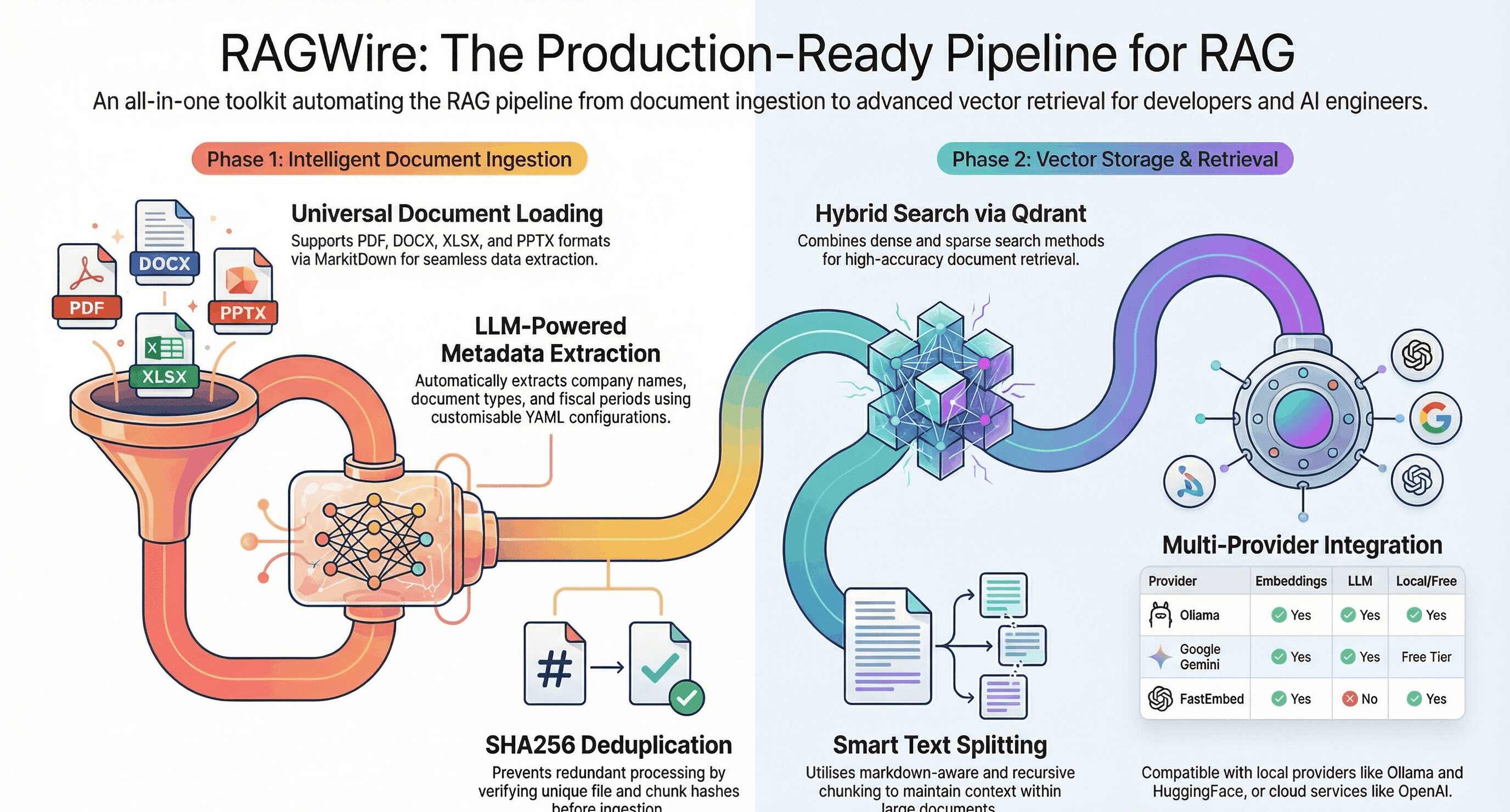
Features
Ingestion
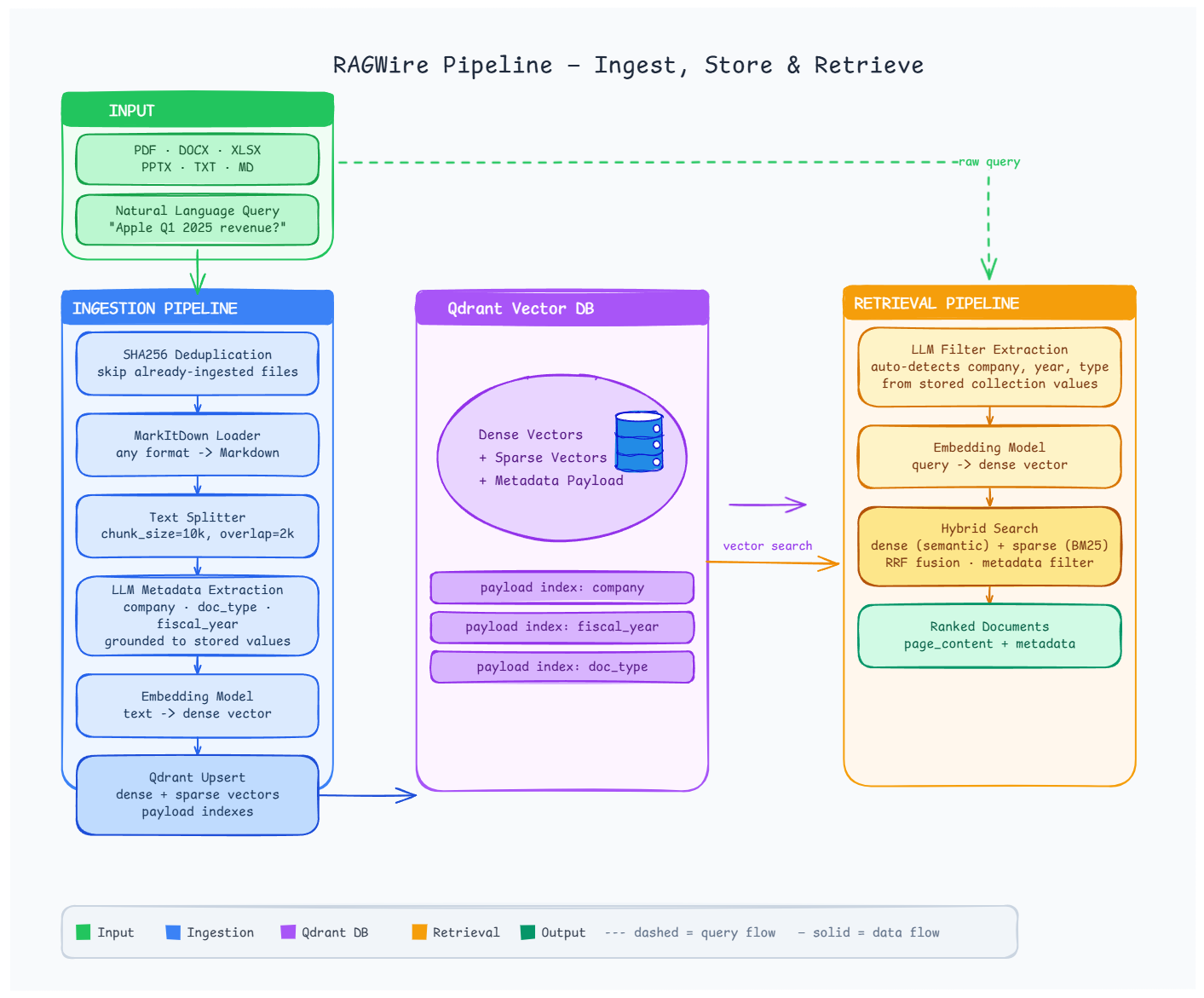
- Document Loading: PDF, DOCX, XLSX, PPTX and more via MarkItDown
- LLM Metadata Extraction: extracts company, doc type, and fiscal period automatically
- Smart Text Splitting: markdown-aware and recursive chunking strategies
- SHA256 Deduplication: at both file and chunk level, so nothing is ingested twice
- Source Sync: reconcile against local folders and S3, including the deletions plain ingestion never notices
Retrieval and answers
- Multiple Embedding Providers: Ollama, OpenAI, OpenRouter, HuggingFace, Google, FastEmbed
- Qdrant Vector Store: dense, sparse, and hybrid search
- Advanced Retrieval: similarity, MMR, and hybrid search with metadata filtering
- Reranking: optional cross-encoder second stage, local and API-key-free by default
- Grounded Answers: cited answers that refuse rather than guess, sync and async
Operating it
- Evaluation: recall@k, MRR and config sweeps against your own golden set
- MCP Server: expose a collection to Claude Desktop, Claude Code and Cursor
- CLI:
ragwire ingest,sync,evalandmcp serve
Architecture
Installation
pip install ragwire

# With Ollama support (local, no API key)
pip install "ragwire[ollama]"

# Optional capabilities
pip install "ragwire[rerank]"   # local cross-encoder reranking, no API key
pip install "ragwire[mcp]"      # MCP server for Claude Desktop / Code / Cursor
pip install "ragwire[s3]"       # S3 source connector for rag.sync()

# Everything
pip install "ragwire[all]"
None of the optional extras are needed for the core install, and evaluation needs no extra package at all.
Quick Start
from ragwire import RAGWire

rag = RAGWire("config.yaml")

# Ingest documents
stats = rag.ingest_documents(["data/Apple_10k_2025.pdf"])
print(f"Chunks created: {stats['chunks_created']}")

# Ask a question and get a cited answer
answer = rag.query("What is Apple's total revenue?")
print(answer.formatted())

# Or work with the chunks directly
results = rag.retrieve("What is Apple's total revenue?", top_k=5)
for doc in results:
    print(doc.metadata.get("company_name"), doc.page_content[:200])
Where To Go Next
| If you want to | Read |
|---|---|
| Get running from scratch | Installation & Setup |
| Follow a worked example | Quick Tutorial |
| Get answers rather than chunks | Answer Questions |
| Improve result quality | Reranking |
| Find out whether a change helped | Measure Retrieval Quality |
| Use your documents from Claude or Cursor | MCP Server |
| Keep the collection current automatically | Sync Sources |
| Scope queries to the right documents | Metadata & Filtering |
Supported Providers
| Provider | Embeddings | LLM | Free |
|---|---|---|---|
| Ollama | Yes | Yes | Yes (local) |
| OpenAI | Yes | Yes | No |
| OpenRouter | Yes | Yes | Free tier |
| Google Gemini | Yes | Yes | Free tier |
| Groq | No | Yes | Free tier |
| Anthropic | No | Yes | No |
| HuggingFace | Yes | No | Yes (local) |
| FastEmbed | Yes | No | Yes (local) |
Links
- GitHub: github.com/laxmimerit/RAGWire
- PyPI: pypi.org/project/ragwire
- YouTube: youtube.com/kgptalkie
- Website: kgptalkie.com